This is only for people with sense of humour and Monty Python lovers:
Big is better ;-) Big is Fine ;-) Meet Biggus Dickus ;-). Never enough distance to Yourself - Enjoy !
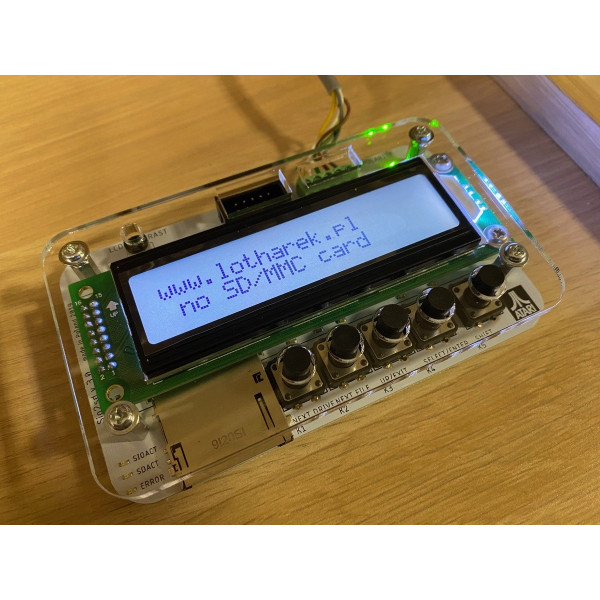
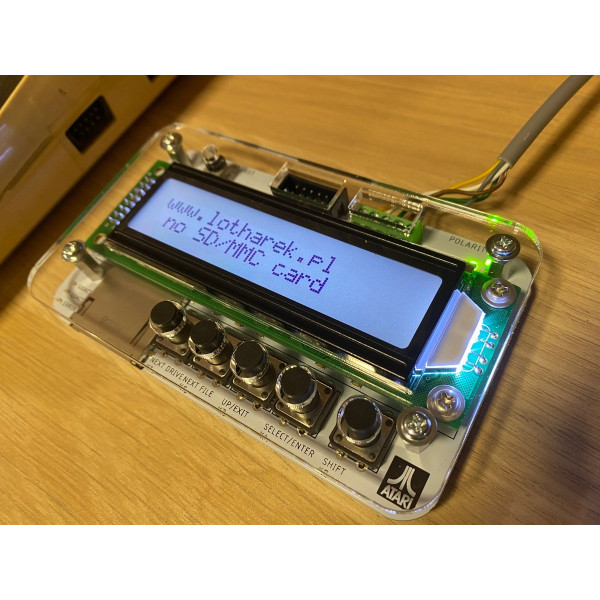
Newest SIO2SD variation with many changes:
- LCD 2x20 (compared to 2x16 in original)
- heavy duty tact buttons
- Hirose heavy duty SD SLOT (push-pull), used in HXC Floppy Emulators
- polarity protection with indicators led (OK/NOK polarity)
- semi case - acrylic cover
SIO2SD is a device that allows you to load games/applications into 8-bit Atari computers via SIO interface from SD/MMC cards.
IN THE BOX
- a tested and safely packed device
DISCLAIMER:
Device abilities:
- Works with SD/MMC (FAT12,FAT16 and FAT32 formats)
- Handles ATR (R/W), XFD (R/O) and COM/XEX (R/O) file types
- 20x2 LCD display allows to browse the catalog tree and choose files to load
- Handles SIO with turbo (allows to set speed index from 1 to 16, default is 6 (69kb/s), in versions 1.x speed index was always 10 (51kb/s))
- All densities with 128B and 256B sectors, including 16MB disks
- Handles drives d1 to d8 (up to version 1.2 only D1: to D4: drives were available)
- Can be configured using ATARI (it's possible to load configuration tool directly from MCU flash memory, so no SD card is needed)
Basic usage
- You have to format SD card using a PC. Remember to use FAT format as above.
- In the root directory of the card, create a folder called Atari. You need to place all files in this folder, anything outside of it will not be visible to the device. It is advisable to do not place more than about 100 files for best performance. You can use subfolders to organise your files.
- On the first use, SIO2SD will create a SIO2SD.CFG file in the root directory of the card. This keeps whole configuration of the device (for example files to drives mapping).
Buttons
- K1: next Atari drive (D1,D2,..)
- K2: next file/folder
- K3: parent directory (cd ..)
- K4: go to folder/map file to current Atari drive
- SHIFT+K2: firmware upgrade
- SHIFT+K4: turn off current Atari drive ("eject disk")
Options:
- SIO high speed
- off
- hsindex from 1 to 16 (6 is the default setting)
- Configuration tool load (when to override D1: to load configuration program)
- never
- startup+shift - only when SHIFT was pressed during startup (power on)
- every startup
- no card - only if SD card is not inserted (default setting)
- shift pressed - SHIFT always causes D1 override (tested on every SIO 'S' command on D1: - available from version 2.2)
- LED mode (meanig of LEDs)
- SD read/write - first LED shows SD reads, second LED shows SD writes
- SIO read/write - first LED shows SIO reads, second SIO writes
- SD act/SIO act - first LED shows any SD activity, second any SIO activity
- device id (number of device for SIO2SD.XEX - available from version 2.2)
- write protect (write protection in ATR files - available from version 2.2)
- never - ATR's are always R/W (write protect flag ignored)
- obey ATR flag - obey ATR write protect flag - default
- always - ATR's are always R/O